

.png)

- Data is AI-ready when it meets the needs of one defined AI use case, so readiness is measured use case by use case.
- Gartner predicts organizations will abandon 60% of AI projects unsupported by AI-ready data through 2026.
- Data that works for dashboards can still fail an AI system, because AI needs context, permissions, and edge cases that reports never used.
- Ayrin's six tests show whether data is ready for a use case: Scoped, Reachable, Trustworthy, Understood, Permissioned, and Current.
- Readiness decays after launch, so freshness checks, test sets, and user feedback have to run as an ongoing job.
AI-ready data is data an AI system can access, trust, and understand for one defined task, with the right access controls and fresh enough for the job. There is no single company-wide "ready" state: the same data can be ready for a churn model and unready for a support assistant. Ayrin's position, from building these systems: name the use case first, and most of the readiness question answers itself.
What is AI-ready data?
AI-ready data is information an AI system can use to produce correct, permitted output for one defined task. IBM defines it as "high-quality, accessible and trusted information" for AI training and initiatives. Gartner adds the part most definitions skip: the data "must be representative of the use case," including its patterns, errors, and outliers.
That second point is why a single enterprise-wide readiness score misleads. A customer table can be ready for a churn model and unready for a support agent that needs ticket history, product manuals, and entitlement rules.
Why every definition of AI-ready data sounds different
Search "AI-ready data" and the top results include a Reddit thread asking what it means and a LinkedIn post calling it a myth. In Ayrin's read of the pages that rank, most definitions come from vendors, and each one describes the layer it sells: storage vendors describe storage, catalog vendors describe metadata, integration vendors describe pipelines.
Our position is that all of those layers matter, and none of them defines readiness on its own. Readiness is a pass or fail against the needs of one use case.
What does "machine-understandable" data mean?
Machine-readable data can be parsed. Machine-understandable data also carries its meaning: field definitions, units, relationships, lineage, and usage rights. The US Department of Commerce's guidance on generative AI and open data asks publishers to make data machine-understandable as well as machine-readable.
The Open Data Institute's framework for AI-ready data groups the requirements into four pillars: dataset properties, metadata, surrounding infrastructure, and governance. Both were written for public data, and both apply inside a company.
Why does data readiness decide whether AI pays off?
Data is where most AI projects stall, and the research points the same way from several angles:
- Most organizations are not ready. 63% of organizations either lack or are unsure they have the right data management practices for AI, according to a 2024 Gartner survey of data management leaders. Gartner predicts that through 2026, organizations will abandon 60% of AI projects unsupported by AI-ready data.
- Few projects reach scale. Just 16% of AI initiatives have reached enterprise scale, per IBM's Institute for Business Value 2025 CEO Study.
- Adoption is not producing impact yet. In an NBER study of nearly 6,000 executives in the US, UK, Germany, and Australia, 69% of firms use AI, yet 89% report no impact on labor productivity over the past three years.
- Systems that can't learn from context stall. MIT NANDA's 2025 study found 95% of organizations getting zero return from generative AI, and named the core barrier as systems that don't retain feedback or adapt to context. Context is data work.
There is also a perception gap. In a 2026 Drexel University LeBow study co-produced with data integrity vendor Precisely, 88% of 505 data and analytics leaders said they have data readiness for AI, while 43% named data readiness as the most significant barrier to AI alignment. A Harvard Business Review Analytic Services survey sponsored by Cloudera found only 7% of more than 230 respondents say their data is completely ready for AI. The two surveys asked different people different questions, and both sponsors sell data tools.
Our read of those numbers matches what we see in scoping calls: teams feel ready in general and find the gaps once a real use case arrives. FiveForty's support data had existed for eight years. It only became usable for AI once one use case, helping consultants resolve tickets, defined what "ready" had to mean.
How is AI-ready data different from analytics-ready data?
Data built for dashboards is a good starting point for AI, and it is rarely enough. A dashboard shows a person an aggregate, and the person supplies the judgment. An AI system acts on individual records and documents, often without anyone reading the input first.
| Dimension | Analytics-ready data | AI-ready data |
|---|---|---|
| Who consumes it | A person reading a chart | A model or agent acting on records |
| Error tolerance | Outliers get averaged away | Outliers and edge cases must be present and labeled |
| Structure | Tables and aggregates | Tables plus documents, tickets, emails, images |
| Context needed | Column names and a dashboard legend | Definitions, relationships, and business rules the model can read |
| Permissions | Controlled at the report level | Enforced per record or document at retrieval time |
| Freshness | Daily or weekly refresh is fine | Matches the decision, sometimes minutes |
| Failure mode | A wrong number on a chart | A confident wrong answer or a data leak |
The six tests of AI-ready data
Ayrin's six tests turn the criteria that recur across the IBM, Gartner, and ODI definitions into a pass-or-fail checklist for one use case. Score each test pass, partial, or fail. A use case is ready to launch when every test it depends on passes.
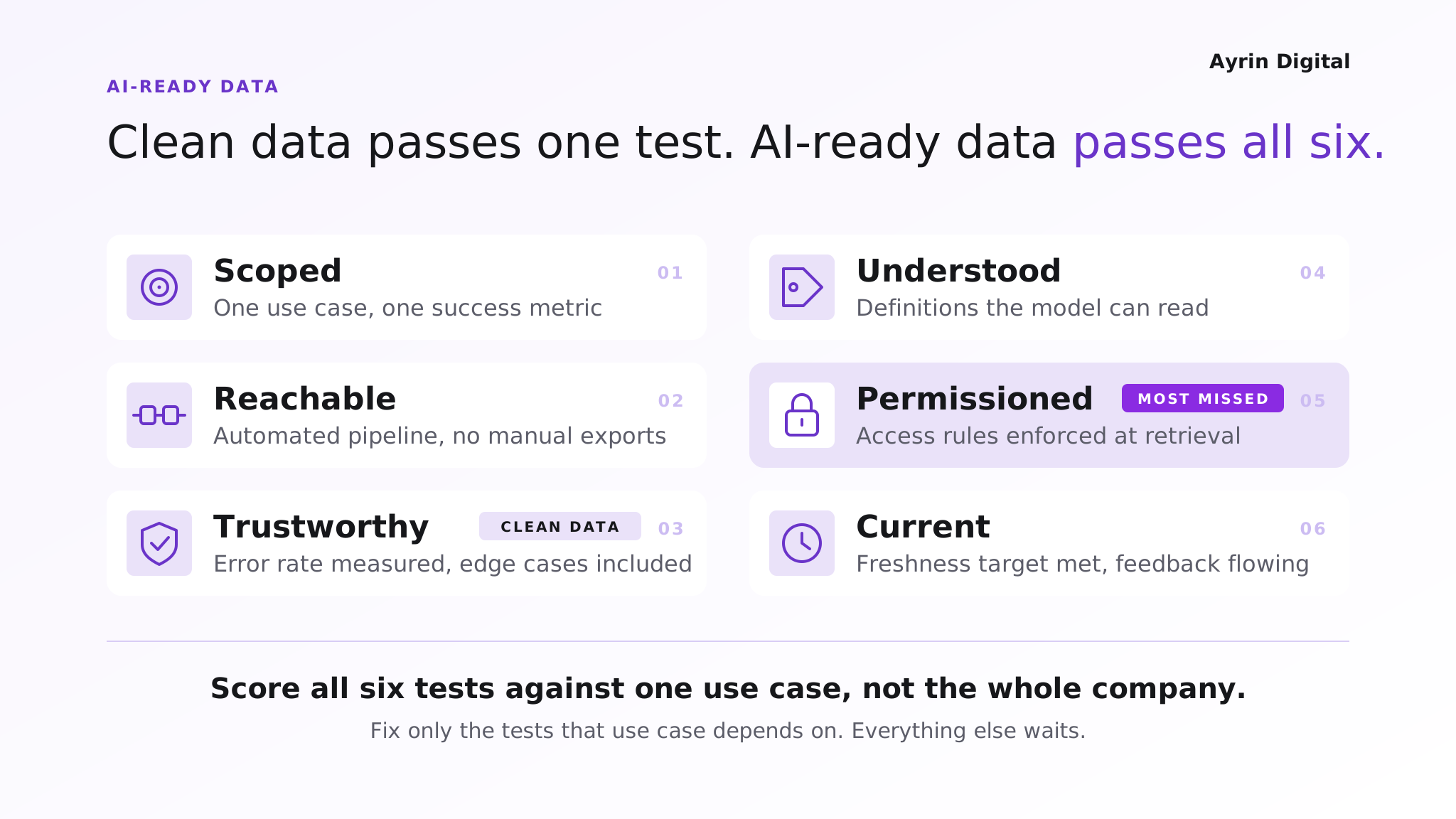
1. Scoped
The data is tied to one named use case with a success metric.
How to check: can you name the task, the decision it supports, and the fields and documents it needs?
Pass signal: a written list of sources and fields, with an owner for each.
In practice: FiveForty scoped its first use case to one job, helping consultants resolve new tickets with context from past ones, and to one metric: daily usage, tracked on a dashboard set up before launch (CEO Jonathan Lascaux on measuring success).
2. Reachable
The AI system can get the data programmatically, through a stable connector, API, or pipeline. Manual exports and emailed spreadsheets fail this test.
How to check: how long does it take to pull a fresh copy without a person involved?
Pass signal: an automated path that runs on a schedule or on change.
In practice: for SupraHuman, a fitness coaching platform, the data a coach needed sat across eight separate apps and wearable feeds. Bringing it into one reachable platform was the groundwork behind 70% faster weekly coaching decisions, by the client's own measure (Ayrin case studies).
3. Trustworthy
Quality is measured against the use case, including the edge cases the model will meet.
How to check: sample records, count errors, gaps, and duplicates, and confirm rare cases are represented.
Pass signal: a measured error rate the use case can tolerate.
4. Understood
The meaning travels with the data: definitions, units, relationships, and lineage. A model reading "status = 3" needs to know what 3 means.
How to check: could a new analyst answer the use case's questions from the data and its metadata alone?
Pass signal: documented definitions or a semantic layer the AI system can read.
5. Permissioned
Access rules follow the data into the AI system, and sensitive fields are masked or excluded. OWASP lists weak access control in vector stores as a top risk for retrieval-based AI, and recommends permission-aware retrieval and validated sources.
How to check: can a user retrieve, through the AI, anything they can't open directly?
Pass signal: permissions enforced at retrieval and logged. (See how FiveForty keeps each client project isolated, in the unstructured-data section below.)
6. Current
The data is fresh enough for the decision, and there is a way to feed corrections back.
How to check: compare the data's age with how fast the underlying facts change.
Pass signal: a freshness target, monitored, with a path for user feedback.
In practice: FiveForty's consultants work live tickets, so new tickets sync every 30 to 60 minutes. A nightly load would have left the assistant a day behind the work.
How to make your data AI-ready: a use-case-first sequence
Start from the use case and work backward to the data. This order keeps the scope small enough to ship.
- Name the use case and its success metric. One task, one owner, one number that shows it worked.
- Map the data it touches. List the systems, tables, documents, and people who own each.
- Score the data against the six tests. Mark each test pass, partial, or fail for this use case only.
- Fix the blockers, and only the blockers. A failing test the use case depends on gets fixed now. Everything else goes on a backlog.
- Build the integration path. Connect sources with pipelines that sync changes on a schedule instead of one-off bulk pulls. As our AI-native vs. AI-enabled modernization guide puts it, a pipeline that still relies on periodic exports and manual cleanup has to be fixed first.
- Build a test set before launch. Write the questions or cases the system must get right, with expected answers, and run them on every data or model change.
- Launch, monitor, then widen. Reuse the pipelines and definitions for the next use case, so each one costs less than the last.
How is preparing unstructured data for AI different?
Unstructured data (documents, tickets, emails, chat logs, images) is where generative AI and agent projects break most often. Tables have columns and types. A 40-page PDF has neither until someone extracts the text, splits it into retrievable pieces, and tags each piece with where it came from and who may see it.
| Step | Structured data | Unstructured data |
|---|---|---|
| Main work | Cleaning, joining, deduplicating rows | Extracting text, splitting into chunks, removing noise |
| Unit the AI uses | A record or a query result | A chunk of a document with its source attached |
| Quality check | Null rates, duplicates, value ranges | Extraction accuracy, chunk relevance, language handling |
| Context | Schema and column definitions | Metadata per chunk: source, date, type, language |
| Permissions | Row- and column-level rules | Document-level rules copied onto every chunk |
| Freshness | Change data capture or scheduled loads | Re-index when documents change, retire old versions |
The permissions row is the one teams miss. If a document is restricted, every chunk made from it has to carry the same restriction into the search index, or the AI will quote it to anyone.
From our work: turning eight years of tickets into a working AI assistant
FiveForty, a Microsoft Dynamics 365 consultancy, had eight years of support tickets, project details, and client history sitting in its project management system with no practical way to use it. The source was 46 Azure DevOps projects holding more than 136,000 tickets and 20,000 attachments (PDFs, Word files, images), written mostly in French with some English, and with ticket descriptions stored as often poor-quality HTML.
To make that data usable for an AI assistant for its consultants, we extracted text from attachments, split tickets and comments into retrievable pieces with the ticket title kept as context, and tagged every piece with its project, language, and document type. Each client project stayed isolated, so the assistant only retrieves from projects a consultant is allowed to see. Client names, emails, and phone numbers are masked before any text reaches the model, and new tickets sync every 30 to 60 minutes instead of through bulk pulls.
What does an AI-ready data architecture look like?
An AI-ready data architecture has six layers, and each maps to one or more of the six tests:
- Sources: operational systems, SaaS apps, file shares, and ticketing tools.
- Integration (Reachable): pipelines, connectors, change data capture, and document extraction.
- Storage (Trustworthy): a warehouse or lakehouse for tables, plus a vector index for document chunks.
- Context layer (Understood): definitions, metadata, and relationships, as a semantic layer or knowledge graph.
- Access and governance (Permissioned): identity, record- and document-level permissions, masking, and retrieval logs.
- AI applications (Current): models and agents that read through governed interfaces and send feedback back down.
Standard interfaces between the layers matter more than any single product. The US Federal Committee on Statistical Methodology, in its 2025 guidance on AI-ready federal statistical data, recommends exploring the Model Context Protocol as a controlled way to give AI tools access to data. Keeping the context layer and pipelines in a form you own also protects you from AI vendor lock-in. For deciding which layers to build and which to buy, see Owning Everything Is a Mistake. So Is Owning Nothing. and our build, buy, or blend decision guide.
What governance and compliance rules apply to AI data?
For high-risk AI systems in the EU, data quality is a legal requirement. Article 10 of the EU AI Act requires training, validation, and testing data to be "relevant, sufficiently representative, and to the best extent possible, free of errors and complete" for the system's intended purpose. Providers also have to document data origins, collection processes, and bias checks. Under the 2026 Digital Omnibus agreement, these high-risk obligations apply from December 2, 2027 for Annex III systems and August 2, 2028 for AI embedded in regulated products.
Outside the EU, the same practices answer the questions security reviews and customers ask: where the data came from, who can see it, and how errors get caught. The Permissioned and Trustworthy tests produce that evidence as a by-product.
How much does AI data readiness cost, and how long does it take?
Cost and timeline depend on scope, so we price per use case after scoring the data. Seven drivers move the number most:
- Number of source systems the use case needs
- Share of unstructured content (documents, tickets, emails)
- Size of the quality gap found in step 3
- Permission complexity, such as per-client or per-record rules
- Freshness target, from nightly loads to near real time
- Regulatory scope, such as health, financial, or EU high-risk rules
- Languages the data is written in
For AI agents, the data work is often bigger than the agent build itself. Our guide to what AI agents cost shows how it fits into full build pricing.
Who should own data readiness for AI?
Ownership splits by test. One named person should own the use case end to end.
| Test | Owner |
|---|---|
| Scoped | Business owner of the use case |
| Reachable, Current | Data or platform engineering |
| Trustworthy, Understood | Data owners and stewards for each source |
| Permissioned | Security and compliance, with data owners |
When not to start with a data readiness project
This is our own analysis, from scoping AI builds. A data readiness project is the wrong first move when:
- The value is unproven. Test the idea on a small extract or a prototype first. Don't fix pipelines for a use case nobody has validated.
- The AI already lives inside the app that holds the data. An assistant built into your CRM or office suite brings its own data layer. The work there is mostly permission cleanup, not integration.
- A report or a query already answers the question. If a SQL query or an existing dashboard does the job, it is cheaper and easier to audit than an AI system.
- The source system is about to change. If a system migration lands in the next few months, prepare data on the new system. Our guide to app modernization services covers how migrations overlap.
How do you keep data AI-ready after launch?
Readiness decays as sources change, documents age, and users find gaps. Gartner describes AI-ready data as an ongoing practice, with data management that keeps improving as use cases change. Four routines keep it ready:
- Freshness alerts when a source stops syncing or falls behind its target
- Quality checks on incoming data, with alerts when error rates move
- Test-set reruns on every pipeline, prompt, or model change
- User feedback captured in the interface and routed to data owners, which answers the learning gap MIT NANDA identified